Lookbook

Set continuity for Makeup · Hair · Wardrobe · MUFX

One book for every look on set.

Continuity, script breakdowns, looks, kit, expenses and timecards for the departments that make the look — offline-first, in eight languages, built by working IATSE crew.

In daily use on a network one-hour drama. Free for artists — live on Google Play, iPhone beta via TestFlight. Productions request a licence for the whole crew.

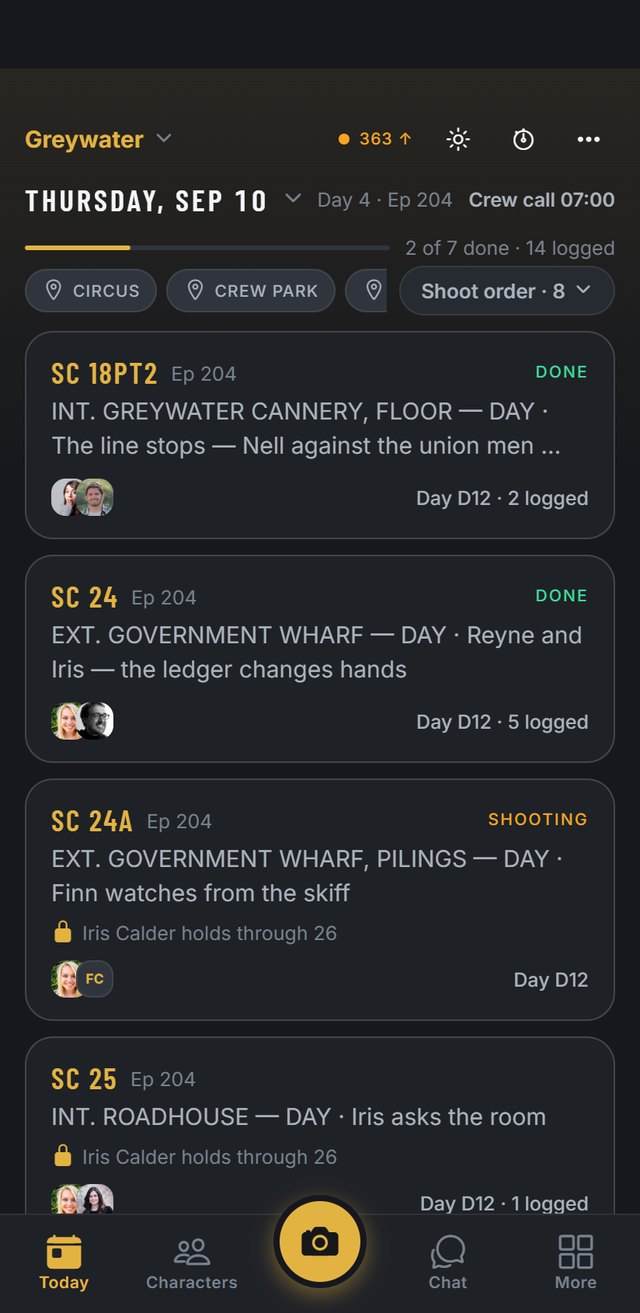
Lookbook's Today screen: the shoot day's date, crew call, next in the chair, and every scene with its status and cast.

Shoot the day, not the paperwork.

Put your show on the distro and the paperwork files itself. Times stamp from the chair. Timecards land on the payroll company's own forms.

Every look, on the record.

Photos label themselves as you shoot. Compare two takes side by side, carry holds across scenes, and hand production the whole book at wrap.

Works where sets are.

Parkades, forests, stages with no signal — offline first, sync later. No service at all? The trailer's own Local Net carries the chat phone-to-phone.

One book, every chair

Built for the department you actually run

Makeup

The look you set this morning, still matchable when the pickup lands months later — photographed and labeled at the chair, not rebuilt from memory. Face charts drawn with your real product shades, layered and versioned. Product records, notes and reference photos all live on the character.

Hair

The style that has to match last Tuesday — photographed, labeled, findable in two taps. Wig and piece notes on every character, the day's chair plan by the week, and the same one-tap timecards as the room next door.

Makeup Effects

Appliances tracked from lifecast through mold, run and set count — and the makeup room's own pieces, transfers, tattoos and out-of-kit, on the same bench. Creature stages carried as looks per character, so episode 7 matches episode 2 even with a different artist in the chair.

Wardrobe

Rolling out next. The continuity book already does the core job — the jacket photographed on Tuesday is findable on Friday — and dedicated wardrobe tools are on the roadmap. Costumers: we'd love your input while it's being built.

The cast, tracked

Your cast, your looks, your history

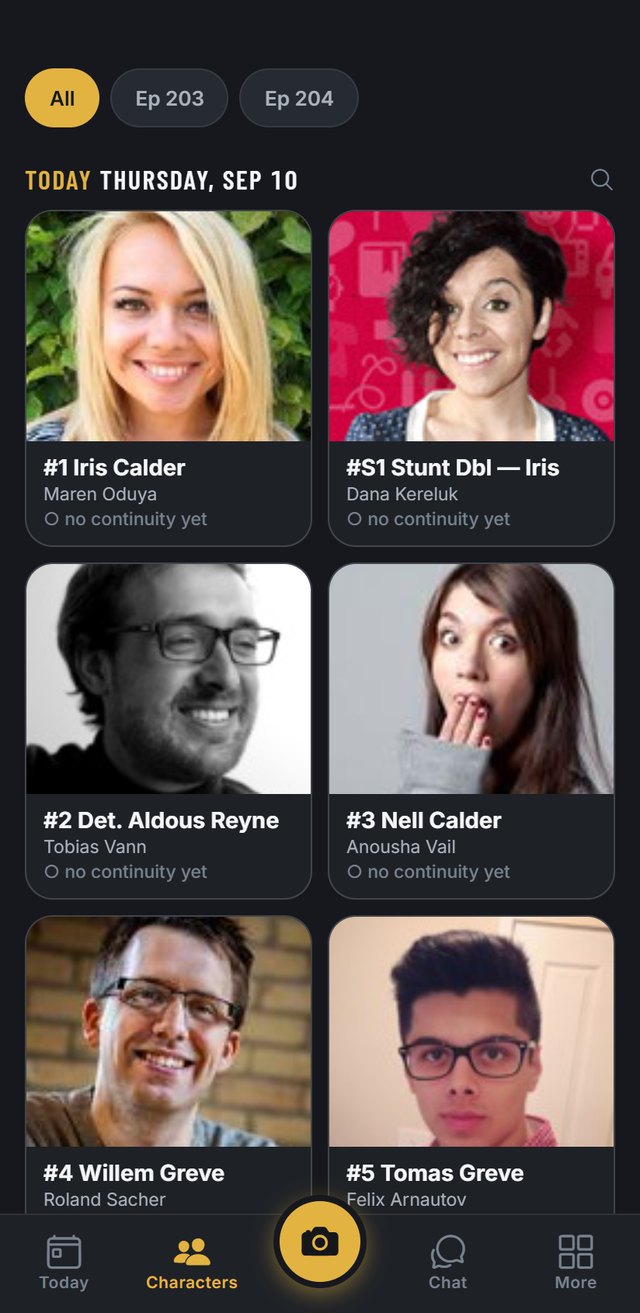
Every character carries their looks, their continuity record, and their story-day progression — the healing bruise, the lace-front that has to match, the re-worn jacket, the creature stages.

  • Continuity that labels itself — character, actor, episode, scene, story day and set burned onto every photo, in the exact format departments hand-write today.
  • Side-by-side compare for pickups and reshoots, with continuity holds surfaced right on the schedule.
  • Face charts on glass — drawn with real product shades on a chart fitted to the actor's actual face, with layers, pins and versioned history.
Lookbook's Characters wall: today's cast with their photos, cast numbers and the actors who play them.
Running the department

Kit, crew, times — one place

Everything a department carries in binders, clipboards and camera rolls, in one app that works with no signal.

  • Paperwork arrives on its own — add your show's Lookbook address to the distro and whatever the office sends files itself the moment it's sent: call sheet, sides, script, one-liner, chrono, shooting schedule, day-out-of-days, background breakdown. Each is recognised for what it is and put where it belongs — the sheet fills the day, the schedules break the show into shoot days, the DOOD gives every character their work days. The schedule family reads straight off the PDF, in seconds, with no AI involved. Not on the distro yet? Add the file — same result.
  • Scene-by-scene breakdowns — script and sides live in the app, read into scenes with your department's work pulled out. More on that below →
  • Crew, calls and bookings — who's working which day, day-call offers artists accept from their phone, and a department chat that stays with the crew.
  • The show's union, named — 21 bodies in one vocabulary, from IATSE 891 and 706 to ACFC, AQTIS and the European agreements; the show and the artist both pick from it. The rule book for the show's agreement sits in the app, and the time card that suits the show is the one that prints.
  • One tap becomes the timecard — chair in and out feeds the daily time report, which fills the payroll company's own official form for the show's jurisdiction, signed on screen.
  • Expenses and receipts — snap the receipt and it's read. Petty cash floated and closed out; P-card, PO and personal each on their own line against the department budget.
  • Inventory, appliances and kit rental — barcode scan with low-stock warnings, and every piece — prosthetics, transfers, tattoos, out-of-kit — stage by stage. Rental rates and start dates on the pieces you rent to the show, and a personal kit that follows you show to show.
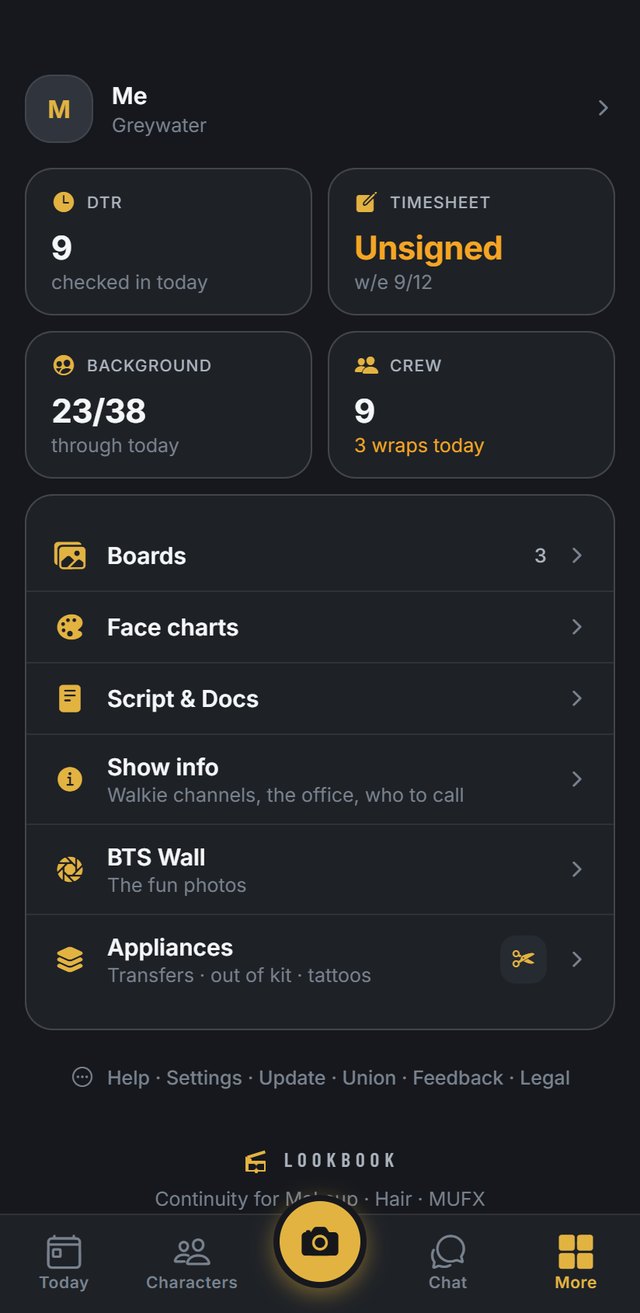
Lookbook's More screen: the DTR, timesheet, background tally, crew, boards, face charts, script and docs, show info and appliances.

Script & sides

The script reads itself

The script comes in off the distro, or you upload it yourself. Either way it comes back as scenes — the full text, who's in each one, and what your department has to do. An 80-page script starts showing scenes in seconds and keeps loading while you read.

Only your department's work

Makeup, hair and MUFX are broken out separately — blood and bruises on one list, wigs and wet-downs on another, appliances on the third. The lines each note came from are highlighted on the script page, and anything the read missed you add with a long press.

It reads out loud

Every character keeps the same voice for the whole script, and the delivery follows the page — a line written as a whisper is whispered. For the drive in, or the end of a fourteen when your eyes are done. Keeps playing with the phone in your pocket.

You'll know what changed

When the blue pages land, the app compares them to the draft you already read and tells you which scenes moved — and which of those you had work on. Notes sit on scene numbers, so a revision carries them along instead of losing them.

Ask it a question

“When does the burn scar first show?” comes back with the scene numbers, so you can go straight there. And the whole breakdown prints as department paper for the key or the trailer wall.

How a day runs on Lookbook

The whole trailer side, one app

Lookbook runs the trailer side's entire day: the office's paperwork files itself off the distro; continuity photos come out of the camera already labeled; one tap in the chair becomes the official payroll timecard. Fully offline — the phone is the source of truth — and the whole crew stays in sync when signal returns.

Continuity that labels itself

You never label another photo again — burst-capture continuity shots come with the label already burned on. Print 4×6s to the trailer printer or share a labeled PDF. Tags like “soot level 2” become findable instead of buried in a camera roll.

Paperwork that files itself

Your show gets its own address. Whatever the office sends — call sheet, sides, script, one-liner, chrono, shooting schedule, DOOD, background breakdown — lands sorted and read, with a push when it does. The sheet brings the full cast table with department and set calls, background counts, locations and notes; arrival alarms follow, and each artist's morning — call, chair, drive, where to park — is one row on Today, with a morning alarm.

Every scene, broken out

Scenes, cast, and the work your chair has to do — each department its own list. Revisions get compared to the last draft so you know what moved, and it'll read the whole thing out loud in cast voices. More →

Background days without the clipboard

A tally built for the tent line. The wrangler's list is one document for the whole day — photograph it, or have it emailed in off a QR — and it lands split at its own headings, role by role. One tap per performer through the chair, numbered reference photos, big groups shot a few at a time and counted by heads, the re-shoot after the dirt goes on filed to the same number, and a printable numbered record of everyone.

From the chair to the timecard

Chair in/out feeds the daily time report. Weekly timecards fill the payroll company's own official PDF forms — mapped by real weekday, signed on-screen, locked once signed.

Expenses, snapped and read

Snap the receipt and the line writes itself. Petty cash floated and closed out, P-card and PO lines kept apart, every expense against the department budget — and the wrap report already adds up.

The department, connected

Crew chat with continuity-labeled photo sharing, polls and voice notes — sealed end to end, and with no service at all one phone hosts the trailer's Local Net and the chat hops phone-to-phone. Reference boards for the look of the day. A manpower calendar with day-call bookings artists accept from their phone.

Offline-first, for real

Everything works with zero signal. The phone is the source of truth; the cloud is a mirror. No connection at all? Hand the day to a teammate phone-to-phone. When signal returns, everything syncs. Wrap is shared: the day closes for the whole crew when it's called, and each artist wraps themselves out on their own time.

Eight languages

English, French, Italian, Spanish, German, Portuguese, Japanese and Chinese. The language is the artist's own; the show's paper stays exactly as the office sent it.

Face charts on glass

Draw with real product shades on a chart fitted to your actor's actual face. Layers, labels, numbered product pins, versioned history. Print it, share it, keep it forever.

The Wrap Archive

At wrap, export the complete continuity book — profiles, looks, product records, per-scene entries and photos — as a deliverable the production keeps.

Your data stays yours

Per-production access control enforced in the database, private deals and calendars, automatic access expiry for day players, and full account deletion. Read the security overview →
For artists

Free for artists. It's your book too.

Productions pay for the show; artists never do. The part of Lookbook that is yours stays with you after wrap, show after show.

My Card

Your name, departments, union cards and availability on one card — the thing a key checks before the day-call goes out. Tap it to share.

The credit book

Every show you work stamps a credit as you work it. The credit sheet prints as a PDF, and the résumé writes itself from it.

Your calendar, your bookings

One availability calendar across every show. Day-call offers land on your phone and you accept from the chair. Held days and booked days are yours to see; your rate is on nobody else's screen.

Portfolio and BTS

The shots you're proud of, released to your portfolio when the show says so. Behind-the-scenes and your face charts stay with you after wrap.

For producers & UPMs

What the production gets out of it

Fewer matching mistakes.

Continuity is photographed and labeled at the chair, the moment it exists — not reconstructed from memory when the pickup gets scheduled. Matching errors are reshoots; reshoots are money.

A deliverable at wrap.

The Wrap Archive — the production's complete continuity book: looks, product records, per-scene entries and photos — exported and owned by the show. The binder, but it can't be left in a trailer.

Paperwork that signs off fast.

DPA ready, security overview written for your reviewers, NDAs executed on request. Production data is isolated per show, and crew chat stays with the crew.

Zero IT lift.

Crew joins with an invite code in under a minute. Day players' access expires automatically after their last day. No accounts to administer, no seats to count, nothing to install on your side.

For productions

Licensed per show. Crew joins free.

A department head champions it; the production licenses it for the run of the show; every artist — keys, dailies, day players — joins free. Licences are tailored to the show's size and schedule.

How licensing works